Dead zones, dropped connections, and slow WiFi cost your business every day. Michigan Security Systems designs and installs commercial wireless networks and business-grade WiFi — fast, secure, whole-building coverage engineered from a real site survey, not guesswork.
We install business-grade access points from Ubiquiti, Cisco Meraki, Ruckus, Aruba, and TP-Link Omada — mesh WiFi, point-to-point wireless, and secure WPA3 networks. Every access point is placed, cabled, and configured by our own W-2 technicians.
Every facility manager knows the frustration: WiFi that works in the front office but dies in the warehouse, drops calls in the conference room, or crawls when everyone's online at once. A properly designed commercial wireless network fixes that — fast, reliable coverage everywhere your people and devices actually are.
Commercial buildings run more connected devices than ever — laptops, phones, VoIP, tablets, scanners, cameras, and IoT sensors all competing for bandwidth. Business-grade WiFi is built to handle that load without slowing down, unlike the consumer routers it usually replaces.
Every device on your network competes for bandwidth. Consumer routers buckle under commercial loads. Business-grade WiFi is engineered to handle hundreds of devices, heavy traffic, and demanding applications without slowing down.
WiFi that only works near the router isn't coverage. The value is in the design — where access points go, how they're cabled and powered, how devices roam between them. That's the engineering work most installers skip.
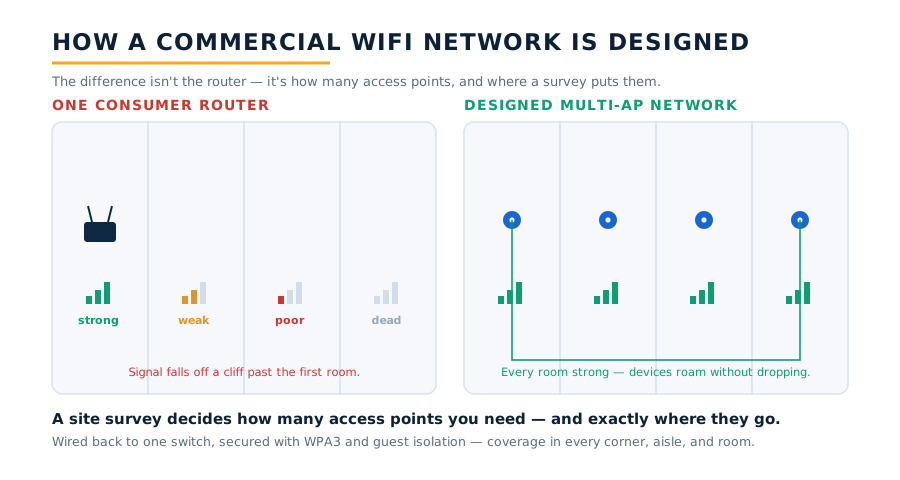
How it works. We start with a wireless site survey to map coverage, interference, and dead zones. Then we place business-grade access points where they're actually needed, cable them back to your network, and configure secure SSIDs, VLANs, and roaming so devices move through the building without dropping.
We're an integrator, not a single-line dealer. We spec the WiFi platform that fits your building, your device load, and your budget — not the one we're contractually obligated to push.
| Platform | Best Fit | Key Capabilities | Connection |
|---|---|---|---|
| Ubiquiti UniFi | Offices, retail, and multi-building sites wanting powerful WiFi at a strong value | WiFi 6/7, sleek APs, no per-AP license fees, great dashboard | Self-hosted or cloud |
| Cisco Meraki | Enterprises and multi-site operations wanting fully cloud-managed WiFi | 100% cloud, deep analytics, strong security, easy multi-site | Cloud (licensed) |
| Ruckus | High-density & tough RF environments — warehouses, arenas, hotels | Best-in-class antennas, excellent in interference-heavy spaces | Controller or cloud |
| TP-Link Omada / Aruba | Budget-conscious offices (Omada) or enterprise IT teams (Aruba) | Solid value and features; Aruba for large managed deployments | Cloud or on-prem |
An honest note on the “just buy a mesh kit” pitch. Consumer mesh systems work in a house — but a warehouse, plant, or multi-floor office is a different animal. What isn't DIY is what determines whether the network actually works: a proper site survey, correct access-point placement and channel planning, PoE cabling, VLAN segmentation, and enterprise WPA3 security tuned to your building.
A single access point just broadcasts a signal. That's a starting point, not a network. Because we install structured cabling, cameras, and access control across Michigan every day, we build WiFi as part of one connected, secure infrastructure — not a box plugged into a closet.
A visitor calls in, and your Axis, Hanwha, or Digital Watchdog camera gives staff a second angle — the door-station view plus the wider scene — so verification is never based on a single narrow shot.
On PDK or CDVI controlled doors, the alert can be correlated with who badged into that wing. Useful in colleges, hospitals and workplaces where access is credentialed.
Calls ring the front desk, the security office, or a staff distribution list on their phones — not a hallway alarm that broadcasts the event to the whole school and teaches students to game it.
Because we also install structured cabling and security systems, your WiFi is built on properly run cable and ties cleanly into the rest of your infrastructure — one integrator, one accountable team.
Location and time-of-day heat maps show whether the program is working. That data is what justifies phase two — and what a superintendent needs at the next board meeting.
Zero subcontractors. The technician who installs the access points works for us, the tech who commissions the network works for us, and the person who answers when it false-alarms in November works for us.
Most facilities assume better WiFi means a bigger router. Modern IP platforms are far more flexible — calls can ring a front desk, a security office, and a set of mobile phones at once, so whoever is available answers the door.
A commercial WiFi network scales cleanly from a single office to an entire multi-building campus on one managed platform. You can start where coverage matters most and expand over time — every access point you add works alongside the ones already in place, with no rip-and-replace.
Worth knowing:more visitors, more deliveries, and tighter security expectations mean facilities want to see who's at the door before opening it — not after.
IP platforms like Aiphone IX and 2N manage many doors from one interface — ideal for schools, hospitals, and property managers — from a single entrance to dozens across a campus. IP platforms that scale across many doors tend to fit multi-building facilities best.
For phased projects, we design the network and station layout up front so later additions are simply plugged in — no rip-and-replace, no wasted spend on a system you will outgrow.
Cloud-managed WiFi platforms that scale across many access points and multiple sites tend to fit multi-building facilities best.
In practice: a manufacturer gets reliable WiFi across the plant floor and yard, an office gets fast connectivity in every conference room, and a multi-building campus runs one seamless network across all of it — centrally managed, secured, and monitored from a single dashboard.
We walk the building with your team and identify the entrances that actually matter — main lobby, shipping, after-hours doors, gates. Door locations, network drops, power, and how your staff will answer all get recorded.
Indoor or outdoor, one office or a full campus, based on your building and your budget. You get a real coverage plan and a real access-point count — not a guess multiplied by square footage.
We work with your IT director on VLAN, PoE budget and console access before a single anchor goes in the ceiling. We define who gets alerted, how, and what happens next. This step is where most failed deployments actually failed.
Mounted, cabled, configured and labeled by MSS employees. Summer and after-hours scheduling for occupied school buildings is standard for us.
Staff can answer from a desk station, IP phone, or mobile app — steam, cleaning chemicals, fumes. Tuning that out in the first weeks is what keeps staff trusting the alerts in month six.
Your administrators learn the console, the app and the reporting. Then we stay on the other end of the phone — same company, same number, for the life of the system.
Why placement matters. An access point in the wrong spot — blocked by walls, HVAC, or metal racking — creates the exact dead zones you're trying to eliminate. We position APs based on a real survey so coverage is even, roaming is seamless, and no corner of the building gets left offline.
From a single office to a sprawling warehouse, business WiFi gives every kind of Michigan facility fast, reliable, secure coverage — here's where it earns its keep.
Screen visitors and deliveries at controlled entrances, buzz in patients after hours, and keep restricted wings secure without staffing every door.
Verify drivers and vendors at shipping docks and gates before releasing a door, and give office staff eyes on every plant entrance from one station.
Manage lobby, package-room, and after-hours entry across many units — residents and staff answer the door from a phone or in-unit station.
Control access to city halls, libraries, DPW yards, and public-safety buildings — screen visitors at the door and release entry from the front desk.
Give staff a clear video-and-audio view of everyone at the main entrance, with simple in-unit answering that residents actually find easy to use.
Extend coverage to outdoor yards, gates, and remote buildings with outdoor-rated access points and point-to-point wireless links — no trenching, no dead zones on the property.
As a Michigan commercial WiFi installer and full-service integrator — not a single-line dealer — we install and service every major business wireless platform. We recommend the right brand for your building, your network, and your compliance needs — not whichever line we're locked into. Our most-installed business WiFi brands include:
A note on NDAA compliance: for government, municipal, and federally-funded facilities, we prioritize NDAA-compliant platforms like Aiphone and 2N (owned by Axis Communications). If your project has compliance requirements, we'll spec equipment that meets them — and tell you plainly which brands do and don't qualify.
A representative sample of the commercial WiFi platforms we install — not a complete list. We are brand-independent and source the right system for your project.
Scope the whole picture with our free Security Plan Builder — cameras, doors, bandwidth, storage, and a readiness score for your building. About 3 minutes, no email required.
Build my free security plan →Headquartered in Mount Clemens with branch offices in Wixom and Milford, Michigan Security Systems designs and installs commercial WiFi networks for businesses across Michigan, Ohio and Indiana. From a single office to a multi-building campus, we run the site survey, place the access points, and secure the network — so coverage reaches every corner, warehouse aisle, and parking lot.
Searching for a commercial WiFi installer near you in Michigan? Michigan Security Systems installs and services business WiFi networks, wireless access points, mesh and point-to-point wireless, WiFi 6E and WiFi 7 upgrades, WPA3 security, and guest-network segmentation for businesses across Metro Detroit, Ann Arbor, Lansing, Flint, Grand Rapids, and the surrounding communities of Macomb, Oakland, and Wayne counties. Whether you need to cover a single office, a warehouse full of racking, or a campus of separate buildings, our licensed Michigan technicians handle the survey, installation, and support — never subcontractors.
Business WiFi and wireless coverage across Warren, Sterling Heights, Clinton Township, and the Mount Clemens area — our home county.
Commercial WiFi for Troy, Novi, Southfield, Auburn Hills, and the Wixom and Milford corridor served by our branch offices.
Wireless networks for Detroit, Livonia, Dearborn, and warehouse and industrial sites across Wayne County.
Our commercial wireless and WiFi installations provide:
Access point placement, site surveys, WiFi 6/7, mesh vs. wired backhaul, and WPA3 security.
Read the Guide →Fill out the form below and a Michigan Security Systems specialist will contact you within one business day to schedule your free, no-obligation site survey. We serve businesses throughout Michigan, Ohio, and Indiana.
Michigan Security Systems · 586-466-4490
Macomb County, Michigan
Wixom, MI · Milford, MI
Michigan · Ohio · Indiana
Mon–Sat: 8:00 AM–7:00 PM
24-Hr Emergency: 1-800-941-6797